

Account Configuration
Account settings control how a single wallet operates in a specific DLMM pool: how wide the range is, which strategy to use, how to reopen positions, fee handling, and safety controls.
Two fields are required to enable an account:
- Private key
- Pool (address or URL)
All other fields refine behavior and risk.
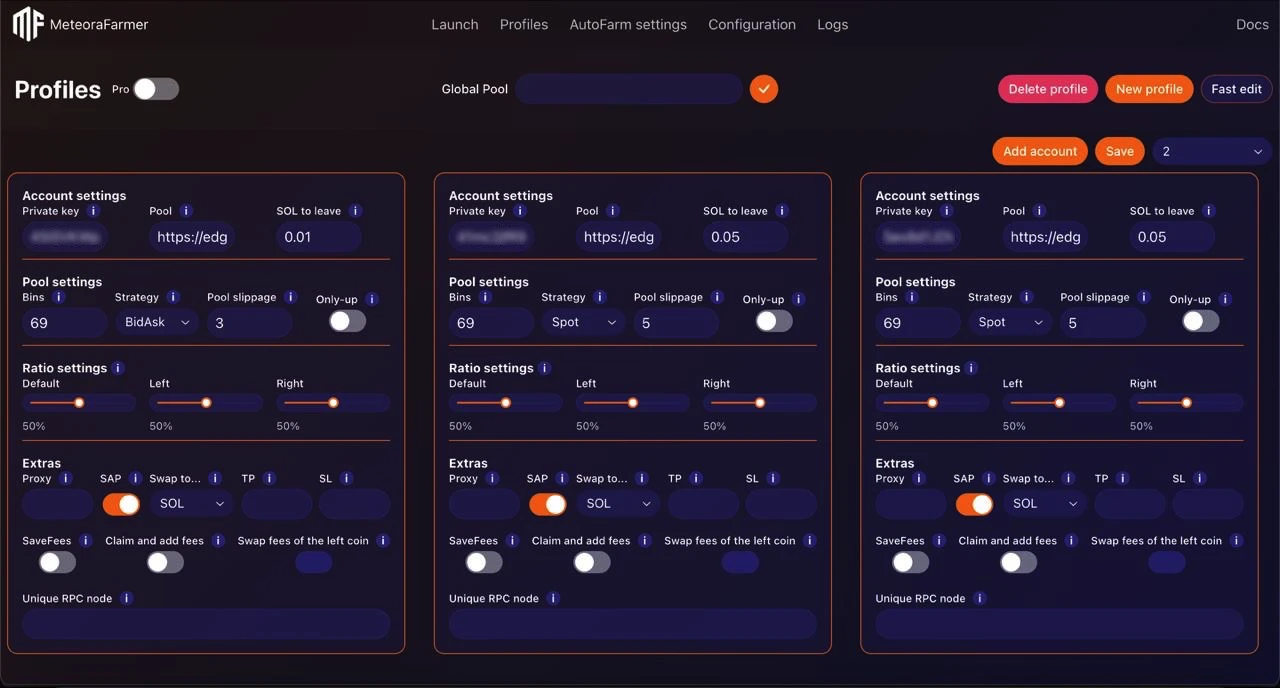
Required
Private key
The Solana wallet private key (base58 encoded). This key controls the funds and must be kept secure.
- Required: Yes
- Scope: Per account only (never shared globally)
- Storage: Encrypted locally (the app never transmits keys externally)
Best practices:
- Use a dedicated LP wallet (not your main).
- Back up securely; do not paste into untrusted tools.
Pool
The Meteora liquidity pool address or a full pool URL.
Position Parameters
Bins
Number of price bins the position spans. Maximum: 69. Default: 69
- More bins = wider price range, lower concentration.
- Fewer bins = narrower range, higher concentration.
- Combine with the pool’s Bin Step to estimate total coverage.
- To open positions larger than 69 bins, use 3 or 5 multipools launch
Pro tip
To open positions exceeding 69 bins, use a launch of 3 or 5 multipools. Check out our multi-pool farming algorithm.
Strategy
Distribution shape of liquidity across bins.
- Values: Spot | Curve | BidAsk
- Default: Spot
Guidance:
- Spot: Even distribution across your bin range. Simple, general-purpose.
- Curve: Concentrates liquidity near the middle of your range.
- BidAsk: Distributes more at the edges. Useful when setting ratios to 0 to open a one-sided bid ask position.
Pool slippage
Maximum allowed price slippage (in %) for Meteora pool operations (e.g., opening a position).
- Default: 5%
- Recommended: 1–5%
- Distinct from “Jupiter swap slippage” in Global Configuration (that one affects swaps routed via Jupiter).
Only Up
If enabled, the bot will only reopen positions when the price action is upward-trending.
- Helps avoid re-entering during downtrends.
- Pairs with “OnlyUp mode time” from Global Configuration: after an out-of-range event, the bot waits this cooldown before reopening.
Ratio Settings
Ratios define the target percentage of the left token in the position (0–100%). The left token is the first token in the pool pair display (e.g., in SOL–TOKEN, left = SOL).
- Default: Applied on the first open.
- Left: Applied when reopening after closing to the left side of the range.
- Right: Applied when reopening after closing to the right side of the range.
Common patterns:
- Default = 50: Start 50/50.
- Left = 0: After closing left (accumulated left token), reopen with selling the acquired left-token to set up one-sided position.
- Right = 0: After closing right (accumulated right token), reopen without buying more of the other side.
- Directional bias: Set Left/Right to tilt reopens toward a preferred asset.
Note:
- Ratios affect how funds are balanced before (re)opening. They do not change your bin count or strategy shape.
Extras
Proxy
Optional proxy for network requests from this account.
- Format:
host:port:user:pass - Leave empty for direct connection.
- Useful for IP distribution when many accounts operate simultaneously.
SAP (Swap At close)
When enabled, pressing the “Close” button (on Launch) will swap all remaining position tokens into the selected asset under “Swap to”.
- If disabled: Close leaves assets as-is (no final swap).
- “Swap to”: Choose which asset to consolidate into (one of the pair tokens).
TP / SL
Price-based exit levels in USD price of the base token.
- TP (Take Profit): When the asset reaches this USD price, the account’s position is closed.
- SL (Stop Loss): When the asset reaches this USD price, the account’s position is closed.
SaveFees
If enabled, claimed fees are kept separate and NOT added back into the active position.
Use cases:
- Realize and park fees to reduce compounding risk.
- Manual reinvest at your discretion.
Claim and add fees
If enabled, the bot periodically claims accumulated fees and adds them to the active position.
- Interval controlled by “Fee claim timer” (Global Configuration).
- If “SaveFees” is also enabled, fees will be claimed but not reinvested.
Swap fees of the left coin
When claiming fees, swap all fees from the left token to the right token before reinvestment.
- Typical pattern: Left = “shitcoin”, Right = SOL → consolidate fees to SOL.
- Effective when your strategy aims to accumulate SOL over time.
Unique RPC Node
Custom Solana RPC endpoint for this account.
- Leave empty to use the global RPC.
- Use for load balancing, redundancy, or provider A/B testing.
- Helpful when running many accounts or hitting rate limits.
Common Pitfalls
- Very tight ranges + zero reopen latency → frequent reopen loops and high tx cost.
- Pool slippage too low in volatile pools → repeated open failures.
- Misunderstanding ratios → accidentally selling accumulated asset on reopen. Double-check Left/Right intent.
- Enabling “Claim and add fees” with a very short fee timer → excessive transaction overhead.
Calibrate per account based on its pool’s volatility, your directional view, and how actively you plan to monitor.