

Global Configuration
These settings apply to the entire application and define how often the engine reacts to market changes, how swaps are executed, and how network resources (RPC) are used. Tune them to match your pool types (stable vs. volatile), infrastructure (local vs. VPS), and workload (number of accounts).
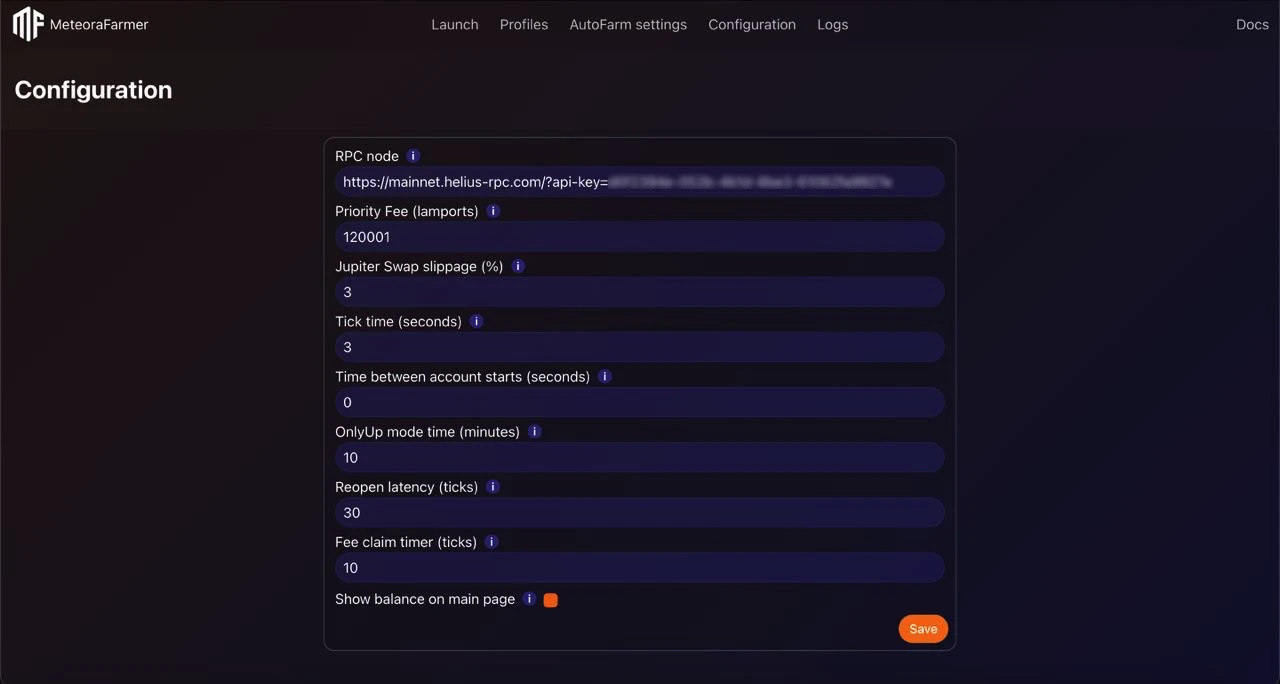
Default values
- RPC Node: Helius (free tier is fine to start)
- Priority Fee (lamports): 200001
- Jupiter swap slippage: 1.5%
- Tick time: 15 s
- Time between account starts: 30 s
- OnlyUp mode time: 10 min
- Reopen latency: 0 ticks
- Fee claim timer: 100 ticks Adjust upward for more volatility/load, downward for calmer markets or to reduce RPC usage.
RPC Node
A Solana RPC endpoint used for all chain interactions.
- Use a reliable provider with good throughput and low error rates (e.g., Helius).
- Free tiers typically support ~10 concurrent accounts; for more, consider paid tiers or distribute load with per-account RPCs (in Account settings).
- Keep an eye on rate limits and 429 errors; adjust “Time between account starts” and “Tick time” if needed.
TIP
If you run many accounts and observe intermittent RPC failures, consider:
- Switching to a paid plan,
- Increasing “Tick time”,
- Increasing “Time between account starts”.
Priority fee (lamports)
Base tip for transactions. Higher values increase inclusion probability during congestion.
- The engine auto-bumps fees by ~20% on failed submissions.
- Start at 200001 lamports and raise in periods of network congestion (launches, high-volatility sessions).
- Too low: more “Block Height Exceeded” or dropped txs. Too high: unnecessary cost.
When to increase:
- Frequent “Block height exceeded”/timeout errors,
- Many retries to open/close positions or claim fees,
- Launch or high-volume windows on your pools.
Jupiter swap slippage
Maximum slippage allowed for swaps routed via Jupiter.
- Lower slippage reduces price impact but increases swap reverts in volatile markets.
- Higher slippage improves success during volatility but may accept worse prices.
- The bot can retry with increased slippage, but you still should set a realistic baseline.
Tick time
How often the engine evaluates positions (liquidation/out-of-range) and rebalancing opportunities.
- Lower values = more responsive, more RPC load.
- Higher values = less RPC load, slower reaction.
Typical choices:
- 2–3 s for volatile pools (tight ranges, small BinStep),
- 4–6 s for balanced setups,
- 8–12 seconds for stable pairs or when using multiple accounts simultaneously.
WARNING
Low “Tick time” with small BinStep pools can cause frequent evaluations and higher RPC usage. Balance responsiveness with provider limits.
Time between account starts
Delay between starting accounts to avoid rate limiting and smooth load across your RPC.
- 3–5 s for a few accounts,
- 5–10 s for 10–25 accounts,
- 10–20 s for larger batches or free-tier RPCs.
Increase if you see RPC 429s or many simultaneous failures at launch.
OnlyUp mode time
Cooldown window (in minutes) to wait before reopening positions when they goes short in price when “OnlyUp” mode is active.
- Purpose: avoid re-entering during downtrends.
- The bot waits this duration after an out-of-range event before allowing a new open.
Reopen latency (in ticks)
Number of ticks to wait after a liquidation/out-of-range event before attempting to reopen.
- Helps prevent immediate reopen-close loops in volatile periods.
- Effective IL control when your ranges are narrow or BinStep is small.
Note: Actual delay = Reopen latency × Tick time.
Fee claim timer (in ticks)
How often to claim fees from positions.
Example: with Tick time = 3 s, 60 ticks ≈ 3 minutes.
Common pitfalls
- Setting “Tick time” too low on a free-tier RPC → rate limits and dropped transactions.
- Using very low “Jupiter swap slippage” in high volatility → repeated swap failures.
- Claiming fees too frequently during congestion → wasted priority fees.
- Zero “Reopen latency” with tight ranges → churn loops and excessive txs.
- Very short “OnlyUp mode time” in a downtrend → repeated losing re-entries.
Balance responsiveness, cost, and stability. When in doubt, start conservative and tighten parameters as you observe reliable execution.